



Managing a healthcare financing account is a different task from managing a normal bank account. The important question is not whether an app has a long list of financial tools; it is whether it helps me check the right account, make a payment without confusion, and reach the information I need when a medical or dental bill is already demanding my attention. That is the lens I used with CareCredit Mobile, the finance app developed by Synchrony.
My overall impression is that this is a focused companion for people who already use CareCredit. It is free, rated for Everyone, and available for devices using iOS 11 or later. The app has been around since October 27, 2015, and its current version is 6.5.1. Those details matter less than the central point: this is not trying to replace a complete banking application. It concentrates on access to a CareCredit account, payments, and a digital card.
What I would check before choosing it
I would begin with one practical question: do I have a CareCredit account that I expect to monitor or pay regularly? If the answer is yes, the app makes sense as a dedicated place for that job. If I only need a general budget, a checking account, savings tools, or a complete view of several cards, I would look at my bank’s app or a broader personal-finance tool instead.
The app’s public reception suggests that many account holders find it useful. It holds an average rating of 4.2 from around 45 thousand ratings, with roughly 17 thousand written reviews, and it has passed the million-install mark. I do not treat popularity as proof that every interaction will be smooth, but it does indicate that this is an established mobile option rather than an experimental side project.
My decision criteria would be simple. First, I would want reliable account access. Second, I would look for a payment workflow that is easy to understand before I confirm anything. Third, I would consider whether having a digital card on the phone is genuinely useful in my routine. Finally, I would ask whether a dedicated healthcare-credit app reduces effort or merely adds another login and another place to check.
That last point is easy to overlook. A specialized app can be more convenient because it keeps the relevant balance and payment area together. It can also feel less convenient if I already have several financial apps and rarely use this account. For me, the right choice depends on how often CareCredit is part of my real spending life, not on how many features appear in the store summary.
The everyday situation where it is most useful
Imagine that I have used CareCredit for a dental appointment and want to keep track of the account from my phone. Instead of searching through old emails or opening a desktop browser, I can use the mobile app to check the account, make a payment, and use the digital card when that is the appropriate way to present the account. That is a modest workflow, but it addresses a real moment when speed and clarity matter.
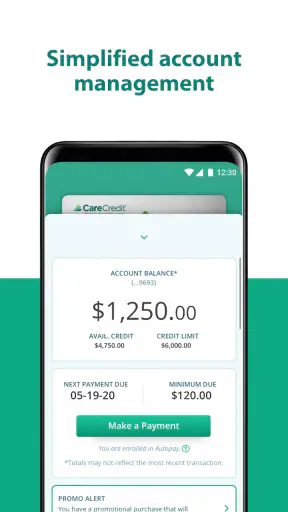
I especially like the idea of checking the account before making a payment rather than relying on memory. A quick review can help me confirm that I am looking at the intended account and that the payment action is being taken from the correct place. I would still slow down at the final confirmation screen and review the amount and destination. Convenience should not turn a financial transaction into a reflex.
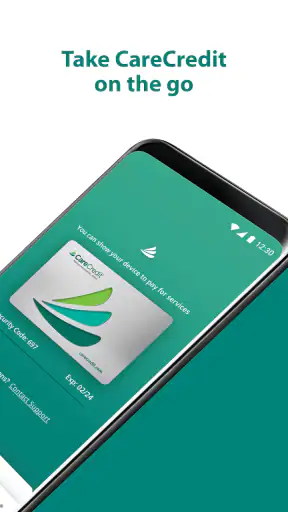
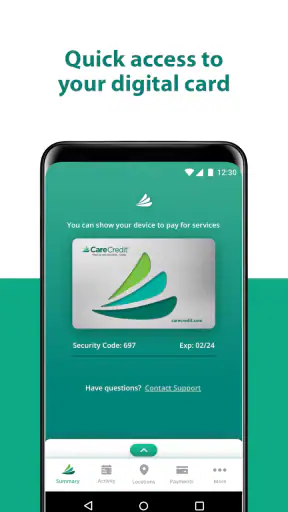
The digital card is another feature that changes the practical value of the app. I would not think of it as a replacement for every physical-card situation. Instead, I see it as useful when I need access to the CareCredit account from the phone and do not want to carry another card or search for it. The trade-off is that a phone-based card depends on having the device available and being comfortable using a digital credential in the relevant setting.
Where the focused design wins
The strongest advantage is concentration. CareCredit Mobile is built around one account relationship, so I do not have to navigate a full banking dashboard to reach the functions I am most likely to need. For someone making periodic payments on a healthcare purchase, that narrow scope can be a benefit rather than a weakness.
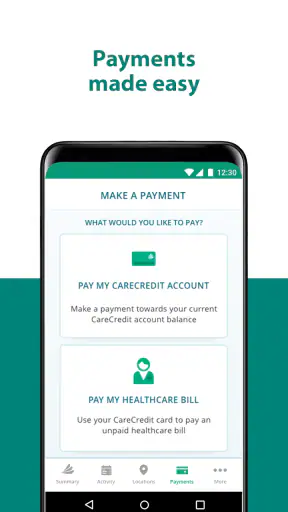
The payment function is the feature I would value most. A dedicated payment path is easier to remember than a process spread across paper statements, saved browser tabs, and unrelated financial tools. I would use the app as a regular checkpoint: open it, review the account, decide what I can pay, and complete the transaction carefully. That routine is more valuable than opening the app only when a due date feels urgent.
Another strength is the connection between account management and the digital card. Those tasks belong together for a CareCredit customer, but they are not normally central to a general budgeting app. Keeping them in one place may reduce the need to switch between a card wallet, a website, and a separate payment page.
The app is most convincing when it removes one small but recurring source of friction. It does not need to become a complete financial command center to be useful. If my main goal is to manage this particular credit account from a phone, a focused tool can be easier to understand than a broader alternative filled with features I will never touch.
Small habits that make the app more useful
I would not wait until the last possible moment to open it. Checking the account earlier gives me time to notice whether I need to adjust the payment amount or find another way to complete the task. This is not a special feature; it is a better workflow built around the app’s account and payment functions.
I would also separate three actions in my mind: checking information, making a payment, and using the digital card. Treating them as different tasks helps me avoid tapping through the app too quickly. The first action is about understanding the account, the second commits money, and the third is about access at the point of use. That distinction is particularly helpful when I am distracted by a medical appointment or a busy day.
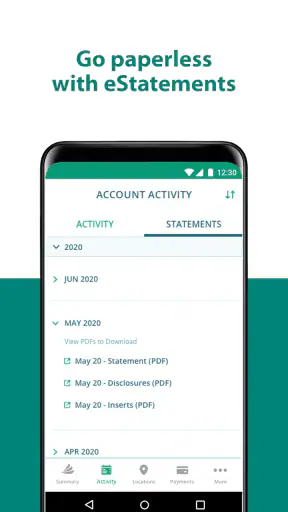
A further practical tip is to use the app as a record-checking tool rather than assuming that a successful tap ends the process. After making a payment, I would look for the app’s resulting account information and keep any confirmation details that are presented. If I need to resolve a question later, knowing what I did and when I did it is more useful than simply remembering that I opened the app.
Finally, I would keep my phone’s operating system compatible. The minimum requirement is iOS 11, so older devices should be checked before I make the app part of an important payment routine. A financial app is only helpful if it can be opened when I need it.
Where a broader alternative may fit better
CareCredit Mobile is not the right choice for someone who wants a complete picture of household finances. A normal banking app is usually a better home for checking accounts, transfers, deposits, and everyday money movement. A budgeting app may be preferable when the main need is categorizing spending across multiple institutions. A general card-management tool may be more suitable for someone who wants several credit accounts in one place.
I would also choose a broader alternative if CareCredit is only an occasional account and I already have a reliable way to manage it through another channel. Installing a dedicated app has a cost in attention, even when the download itself is free. I have to remember another login, decide whether notifications are useful, and maintain another application. For an account I rarely touch, that extra layer may not repay itself.
There is also a difference between account management and financial planning. The app can help me interact with the CareCredit account, but I would not expect it to replace a budget, debt payoff plan, or full spending review. If I am trying to understand how a healthcare payment affects my monthly cash flow, I would use this app for the account-specific information and a separate tool for the larger decision.
That division of labor is important. I would not blame a focused account app for lacking the broad features of a personal-finance platform. Instead, I would decide whether I want specialization or consolidation. CareCredit Mobile wins when I want the former; a bank or budgeting app wins when I want the latter.
What switching really involves
Moving from a browser-based routine to the mobile app is not just a matter of installing it. I would first make sure I can access the correct CareCredit account, then review the available account information, and only afterward make a payment. The first session should be treated as setup and verification, not as a rushed transaction.
The cost of switching is mainly organizational. I may need to change where I look for account information, decide whether the digital card belongs in my normal phone workflow, and learn the location of the payment controls. That learning curve should be manageable because the app’s purpose is narrow, but it is still worth allowing a few minutes to become familiar with the screens.
I would also avoid changing my established payment reminders until I know the app fits my routine. The app can become the place where I check and pay, while my existing calendar reminder remains the prompt to do it. Once I trust the workflow, I can simplify the routine if I want. Keeping the reminder during the transition is a sensible safeguard.
For people who prefer paper statements or desktop access, switching may provide less benefit. A larger screen can be more comfortable for reviewing details, especially if I am already sitting at a computer. The phone app is most compelling when the convenience of immediate access outweighs that preference.
Privacy, access, and practical expectations
Because this is a finance app connected to a healthcare-credit account, I would use the same care I apply to any financial service. I would protect the phone, avoid sharing login details, and take a moment to confirm that I am in the genuine app before entering account information. I would also avoid making a payment while distracted or connected to an environment where someone could easily see the screen.
The Everyone age rating makes the app broadly accessible, but that does not mean every user will find the financial decisions simple. A parent helping another adult, for example, should still make sure the account holder understands what is being checked or paid. Accessibility of the app is not the same as permission to manage someone else’s account.
I would keep expectations realistic about support as well. A mobile interface can make account access easier, but it does not remove the need to resolve account-specific questions through the appropriate customer-service route when an issue cannot be settled on screen. The app should be viewed as a convenient control point, not as a guarantee that every unusual situation will be solved inside the app.
My recommendation for different types of users
I recommend CareCredit Mobile to an active CareCredit customer who wants a straightforward way to check the account, make payments, and keep a digital card available. It is especially suitable for someone who manages money primarily from a phone and prefers a dedicated interface over repeatedly finding the account through a browser.
I would recommend it less strongly to someone who wants one app for every financial account. That person may be happier with a bank application or a budgeting service that brings several accounts together. I would also hesitate if the account is used so rarely that another app would become clutter rather than convenience.
For a household managing a healthcare expense, my preferred approach would be to use the app for the narrow operational tasks and a separate budget for the wider plan. I would check the CareCredit balance or account information, decide on a payment using the household budget, and then return to the app to complete the transaction. That workflow respects the app’s strengths without asking it to do a budgeting tool’s job.
Synchrony has kept the product centered on the needs of CareCredit users, and that focus is the reason to choose it. The app is free, has a mature history, and is currently at version 6.5.1. Those points make it a reasonable addition for the right account holder, but they should not persuade someone who does not need dedicated CareCredit access.
My final verdict is positive but deliberately specific: I would install it if CareCredit is part of my regular financial routine. The payment access and digital-card convenience can save time, especially when I want to handle the account from my phone. I would skip it if my priority is broad money management or if I already have a simpler, dependable way to handle this one account.
In short, CareCredit Mobile works best as a practical account companion, not as a replacement for a bank or a financial-planning system. Used with that expectation, it gives CareCredit customers a focused way to stay connected to the account and act when needed. For me, that clear purpose is its biggest strength—and also the boundary that tells me when another type of app would be better.


